
The loop is just that - a loop of plastic covered wire. It can be small enough to wear like a necklace around your neck (in can even be small enough to fit inside a telephone handset!), or large enough to go around a whole room. The loop is plugged into a box of tricks called an amplifier; also plugged into the amplifier is a microphone.
The microphone picks up the sound, and passes it to the amplifier. The amplifier sends a small electrical current along the loop of wire. This electrical current produces a magnetic field, and it is this magnetic field that your hearing aid picks when you switch your hearing aid to the ‘T’ position. Your hearing aid turns the magnetic field back into sound.
The amplifier also controls the volume of the sound your hearing aid receives. It does this by altering the electrical current running through the loop - which increases or decreases the magnetic field strength. The stronger the magnetic field - the more volume.
The best reception is within the actual loop itself - but you will be able to pick up outside the loop as well. The further you are from the loop, the weaker the signal gets.
There are several basic types:
The loop of wire is fitted around the skirting board, under the carpet, or around a picture rail. It is connected to an amplifier box, which usually sits by the TV, and has a microphone attached to the TV speaker. Depending on what type of TV you have it can be connected directly into the TV through an audio input lead or SCART lead. The advantage with a room loop is that there are no wires to see, or to fall over. It can also be used by several people at once - as long as they have a hearing aid with a ‘T’ position.
|
Ó Heidi Walsh 2000 |
A bigger version of the room loop above can be used to loop rooms in buildings such as churches, theatres, etc.
This uses either a neckloop - which looks like a thick necklace, and works with your hearing aid on ‘T’, or headphones for people who don’t have a hearing aid. The neckloop, or headphones are plugged into a small amplifier box, which is battery powered. Also plugged into the amplifier is a microphone which is attached to the TV, or handed to the speaker. You can also get a small ‘stub’ microphone which you can point towards a speaker (this only works provided that you are within about 3 - 4 feet of the speaker). A SCART adaptor for direct connection is usually available as well.
The biggest problem with a personal amplifier is that you can forget you are wearing it, and get up to make a cup of tea! There are also sometimes problems with people, children and pets tripping over the wire leading from you to the TV.
An advantage with the personal amplifier is that it is portable. It can be useful for taking on holiday, to visit friends, even on visits to the hospital!
A counter loop is a small loop fitted to a counter in a bank, post office, or somewhere similar. It means you can use your hearing aid on ‘T’ to listen to the person the other side of the counter - but should mean that other hearing aid users will not be able to pick up the signal.
An inductive coupler is the name for the small loop fitted in some telephones. If a telephone handset is fitted with an inductive coupler then you switch your hearing aid to ‘T’ and the sound will be sent straight into your hearing aid. Not all telephones have inductive couplers, but all BT public telephones do, as do all motorway emergency phones. The handset needs to be actually touching a behind-the-ear hearing aid for this to work, and you may need the volume on your hearing aid up full.
You can buy a portable, clip-on inductive coupler, and amplifier to keep in your pocket/handbag to use on phones that don’t have an inductive coupler.
Using a loop means that the sound goes straight into your hearing aid. This is useful because:
If your hearing aid is switched to ‘T’ then it will only pick up the sounds coming through the loop microphone. This can mean that you might not hear other things such as the doorbell, or telephone ringing - even your partner speaking.
Some amplifier boxes will take two microphones and you can use a second microphone to pick up sounds such as your partner, or the doorbell, etc. You can put a second microphone near where your partner sits, or use a different type of microphone (called a conference microphone, or boundary microphone) on a coffee table to pick up friends talking, etc. There are lots of things you can try to solve these problems. If you have a specific problem try asking your Lipreading Teacher.
One other problem you can sometimes have with a loop, happens when you have two loops close together. The magnetic fields from each loop get mixed up, and you pick up sound from both loops. This can be very confusing. It can occasionally happen with flats, where two flats next to each other both have loops. The problem can be solved by using personal loop amplifiers, or using seatpads.
Another thing to remember is that you can sometimes still pick up from the loop, even when you are not inside it. The further away you are the weaker the signal - but the signal does extent beyond the actual loop itself. If you are using a loop remember that other people with hearing aids may be able to hear as well - especially important if you are using the loop for a personal conversation. This can be solved by using a personal loop amplifier.
Sometimes you can get interference when using a loop. Electrical equipment can interfere with the magnetic field that the loop produces - this causes the buzz that you can hear. Things that often cause interference are: electric motors in things like washing machines, dishwashers, etc.; flourescent lights; computers; electric cables.
If you are picking up a buzz, try turning off electrical equipment near the loop and seeing what happens. Occasionally you can get interference from equipment next door. If you are still having problems it may be worth trying a personal amplifier, as they are less likely to pick up interference.
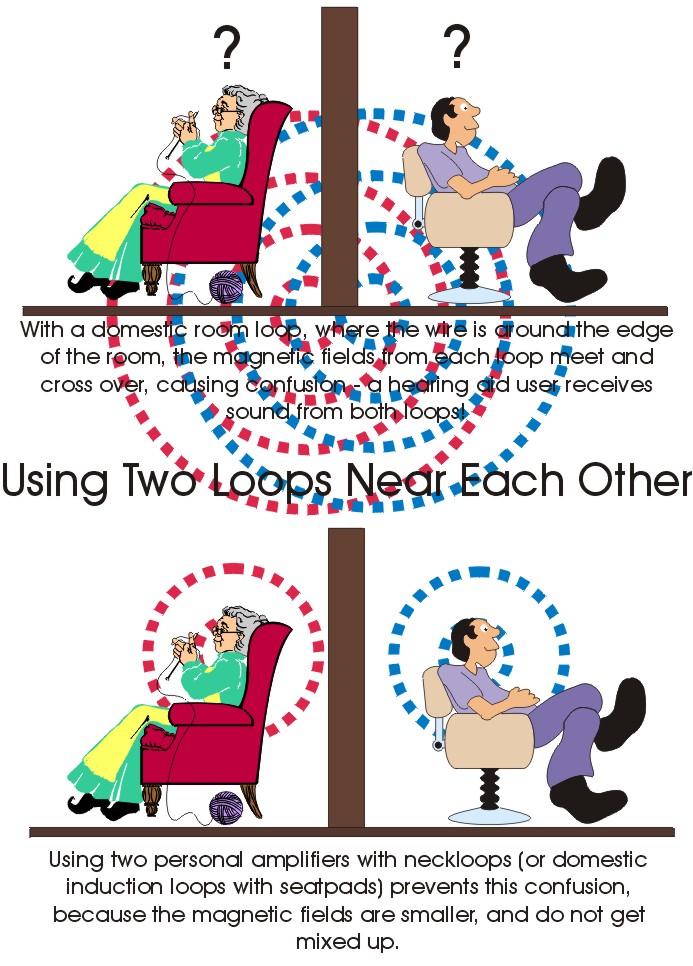
Sometimes a room loop might not be fitted properly - often if you fitted it yourself. The loop must be level. If you have passed it up and over doors and windows, rather than along the skirting board (under the carpet), then the magnetic field may not be even. If this happens then you will get ‘dead spots’ where you can’t pick up from the loop properly.
The magnetic field is very small and is not dangerous.
The electrical current in the loop is very small, and is quite safe - although try not to let pets chew through it!
There are stringent safety checks on loops, and all loop systems must pass British Standards.
To use the loop you need to switch your hearing aid to position ’T’. This is in between the ‘O’ (or ‘off’) position, and the ‘M’ (or ‘on’) position. To get the best signal, make sure you are inside the looped area. Some hearing aids have an ‘MT’ position, where both the microphone and the telecoil are switched on at the same time. This can be handy for hearing the telephone ring/doorbell.
Most NHS hearing aids have a ‘T’ position; not all private hearing aids have a ‘T’ position.
If you don’t have a ‘T’ position on your hearing aid it won’t pick up from the loop, but you can use a loop listener with a pair of headphones to listen using a loop.
Some small personal amplifiers also work as loop listeners. The small personal amplifiers are ideal for listening to the TV, and work with either a neckloop, or headphones. If you don’t have a ‘T’ on your hearing aid, or don’t have a hearing aid, then you can use one of these (with headphones) to listen to the TV, AND as a loop listener if you go somewhere that has a loop fitted - for example a theatre or church.
Have a look at the answer to the question above.
If there is a loop fitted at a bank or post office counter, or in a church or theatre, you should see a symbol displayed somewhere. It is a burgundy coloured ear symbol, with a small ‘T’ in the bottom right corner.
You can basically use the loop with anything that makes a sound.
You can use a loop to listen to:
You can either buy a loop:
or, you may be able to have a loop from Social Services on a free, long term loan.

Ask your Lipreading teacher for more information about the provision of loops in your area.
If you can, it is always worth trying a loop in your own home before buying one. This is so you can see if that model suits you - different makes suit different people, as everyone’s hearing loss is different. You can also check that you aren’t picking up interference on the loop - a buzz, from something or somewhere. Most manufacturers are good about giving a full refund if you decide the loop isn’t the right one for you - but there are time limits on how long you can try it out for.
Some areas have charities such as CAMTAD - the Campaign for Tackling Acquired Deafness, or a Deaf Advice Centre, where you can try out equipment. Ask your Lipreading teacher about places that provide this service in your area.
Yes, you can use a loop in a car - this cuts out the background noise from the road, and makes hearing instructions/directions from a partner or friend much easier. There are 2 ways that you can do this, but do remember if you are on ‘T’ then you might not hear emergency vehicles approaching.
Some room loops are now powered by a 12 volt DC converter/powerpack. This means that they can be plugged into a 12 volt cigarette lighter socket in the car, using an adaptor. Some loops even have an option of a car mounting bracket for just this reason. You can then either fit a loop around the inside of the car body, or use a seatpad, which is like a thin cushion with a built in loop which you place behind you. You can use two microphones: one to pick up your passenger speaking (useful for directions), and one to pick up people in the back of the car.
Do not try a D.I.Y job. You must check that your loop works off 12 volt dc, and that it will automatically compensate for different lengths of loop wire - some of the basic loop systems are not able to do this. The best thing to do is PHONE THE MANUFACTURER. Remember, if your loop is on loan from Social Services you must not damage it.
You can also take these loops on holiday to a caravan, and again run them off 12 volt power, and either loop the caravan, or use a seatpad as mentioned above.
You can use a personal amplifier in a car - but you must be very careful not to get tangled up in the wires! I would suggest using a special homemade bag to hang the amplifier behind your seat, and then looping the neckloop over the headrest - not around your neck, this would be dangerous in a car. Pass the microphone behind the seats to the passenger.
Sometimes theatres use an infra-red system - the symbol you may see for this, looks like an ear with waves going into it. This means that sound is transmitted using an infra-red signal across the room. It works in the same way that your TV/video control unit does. To pick up the signal you must either wear a neckloop (with your hearing aid on ‘T’) with a special receiver about the size of a matchbox, or a pair of headphones with a special receiver. The advantage is that both people with and without hearing aids can use the system, and there are no wires.
You can buy an infra-red system to use at home. A small transmitter sits on top of your TV. For people with a hearing aid (and a ‘T’ switch) there is no real advantage over a loop system, although some people say the sound quality is better. For people without a hearing aid (or ‘T’ switch) it does mean that you can use headphones to listen to the TV, radio, etc., but without any wires between you and the TV.
The disadvantages are that you must have a clear line of sight between you and the transmitter - if you don’t you won’t hear anything except static, and the other disadvantage is the cost - a good infra-red system is very expensive (about £200-£250)! A basic set of infra-red headphones, suitable for someone with a mild hearing loss, will cost between £20 and £80.
Be careful - some models only have one volume control: if you have a hearing loss in one ear only, or a different hearing loss in each ear, then you are better off with separate volume controls for each side.
A lot of models available from local shops are stereo. This means that the sound is basically split - with half going in one ear, and half in the other ear. Obviously, if you have a hearing loss in one ear, then you may miss some of the sound - so consider a mono pair of headphones, and an adapter if you need to plug into a stereo system.
Some models are plugged into the headphone socket on your TV. This can cut the sound off for everyone else - so it’s worth checking! If you have a SCART socket on your TV then they can be plugged directly into that.
If you have an infra-red motion detector as part of a security system, then it can sometimes cause interference.
If you can’t hear the TV through a loop, or the sound is very distorted, the best thing to do is use subtitles. To see the subtitles you need a TV set with TELETEXT. You need to switch to Teletext using the TV controls, and select page 888 - this is the same no matter which channel you are watching. This will bring up the subtitles on to the screen. Not all programmes are subtitled, but you can check which ones are by looking in a TV guide.
Standard video recorders do not record subtitles. You can buy video recorders that do record subtitles but they are more expensive. Some TV/video rental shops do have models available that can record subtitles, but you need to ask.
There is also something called the TELEMOLE. This is a piece of special equipment that allows you to watch subtitles on a normal TV that does not have Teletext, and also to record subtitles on your video recorder. The TELEMOLE costs about £200. The TELEMOLE also allows you to see closed captions on pre-recorded videos - see below. Warning .... the TELEMOLE does not work with digital TV signals!
Some (in fact most modern) videos that you can hire from video shops have something called ‘closed captions’. These are simply hidden subtitles. If you watch the video on a normal video recorder you won’t see the hidden subtitles, but if you use a CAPTION READER, you will be able to see the hidden subtitles. If you want to do this you will have to buy a Caption Reader, as well as your video player, or buy a TELEMOLE (see above). A Caption reader costs around about £100. Some modern video recorders can now view closed captions.